✨ New in 1.4 · iCloud Sync — now on iPad and Mac too

Make the list once.
Reuse it forever.

The checklist app for the things you do again and again — packing, daily routine, the gym. Build it once, check it off, and start fresh next time in a tap. Now you can share a list and check things off together, live — on iPhone, iPad, and Mac.

Download on theApp Store Get it onGoogle Play
Free · No account · Works offline
4.8 · 19 App Store ratings
The Checklist: Reusable Lists app library showing reusable, one-off, and daily checklists
🔁 Reuse forever ✈️ Works offline 🔓 No account 🔒 No data collection Open with the Action Button
Why Checklist: Reusable Lists

Less re-typing. More doing.

Every other list app makes you start from a blank page. Checklist: Reusable Lists remembers the list so you don’t have to.

🔁

Reusable templates

Build a list once — then run it again and again. Each run starts fresh while your template stays untouched.

🗂️

One-off & sectioned lists

Need a quick grocery run? Make a one-off. Big trip? Group items into sections and drag to reorder.

📤

Send a copy in a tap

Send any list to a friend with a link. They open it in Checklist: Reusable Lists and it’s theirs to reuse — no account needed.

🕑

History & activity

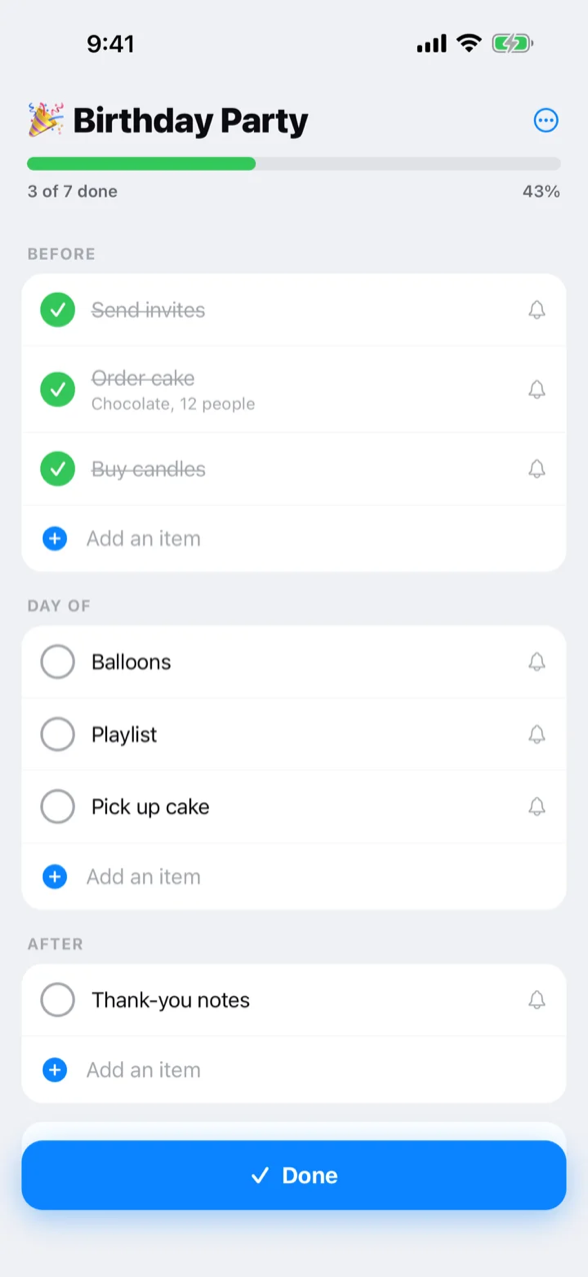
Every run is remembered. The Activity tab shows what you completed and when — each with its start and finish dates.

📌

Pin, search & reorder

Pin favorites to the top, drag to reorder, and search by name or by what’s inside a list — with filters for pinned, reusable, one-off, and daily.

🤝

Collaborate live PRO

Check off one list together — a family packing list, a party plan. Changes sync privately through iCloud, no account. Free to join; hosting is part of Pro.

📅

Daily To-Do PRO

A self-managing daily list: unfinished tasks roll over to tomorrow, finished ones stay on the day you did them. Plan ahead a day at a time.

Quick Add & reminders PRO

Type or dictate a whole list in one sentence and it becomes a checklist. Tap the bell on any item to add a reminder to your calendar.

🖨️

Print & export PRO

Get any checklist onto paper or into a file — print it, save it to Files, or send it to someone without the app.

💻

iPhone, iPad & Mac

One app, every screen. Layouts adapt to the larger display, with Split View, Stage Manager, and pointer support on iPad and Mac.

📋

Paste a list

Paste from Notes or Messages and every line becomes an item — bullets cleaned up, “x2” a quantity, “Heading:” a section. With Apple Intelligence it understands messy wording too, on-device.

☁️

iCloud Sync PRO

Keep your library the same on iPhone, iPad, and Mac, and get it back after a reinstall. Syncs through your own iCloud — no account, no server of ours in between.
PROChecklist Pro is one purchase — $12.99 a year or $24.99 once — with Family Sharing. The free app stays fully unlimited.

1

Build a list

Add items, group them into sections, set quantities. Or start from a free template.

2

Check it off

Run through it with satisfying taps and a live progress bar. Add items on the fly.

3

Reuse it forever

Next time, start from a full list again — no rebuilding, no forgetting.

Start from a ready-made list

Free, expert checklist templates you can open and reuse in seconds.

🧳 Travel packing 🏕️ Camping 📦 Moving 👶 Hospital bag 🛒 Groceries 🚗 Road trip 🏋️ Gym bag 🧹 House cleaning 💍 Wedding planning 💼 Interview prep
Browse templates →
🔒

Private by default. Truly.

No account. No sign-up. No tracking, no ads. Your lists live on your device and work with or without a connection. Nothing leaves your phone unless you choose to share it — and then it travels end-to-end encrypted, or through your own iCloud when you collaborate.

What’s New

Always getting better

A quick look at recent updates. Checklist: Reusable Lists stays free, private, and offline with every release.

Version 1.4.0 Latest
  • Paste a list — paste from Notes, Messages, or anywhere into Quick Add, an “Add an item” field, or the editor. Every line becomes an item; bullets and numbering are cleaned up, “x2” becomes a quantity, and “Heading:” lines become sections.
  • Apple Intelligence — on supported devices, Quick Add and pasted lists are understood by Apple’s on-device model. Private and offline; nothing leaves your device.
  • PRO iCloud Sync — keep your library the same on your iPhone, iPad, and Mac, and get it back after a reinstall. Your lists sync through your own iCloud; no account, no server of ours in between.
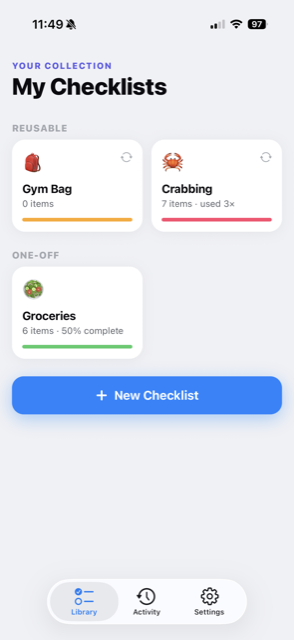
  • Checklist now runs on iPad and Mac. Screens adapt to larger displays — the Library shows more checklists per row, lists keep a comfortable reading width, and everything works in landscape, Split View, and Stage Manager.
  • Pointer support — checklists and menu items respond to hover with a trackpad or mouse on iPad and Mac.
  • Quick Add shows what you typed as the checklist it will become — sections and quantities included — and a new list gets its name from you, never a guess.
  • New lists get a fitting emoji suggested from their title on devices with Apple Intelligence — swap it in a tap, as always.
  • Edit in place — tap any item’s text on a run or a Daily To-Do to change it right there, and touch and hold an item on any list, or in the editor, to lift it and drop it anywhere, even into another section.
  • PRO Collaborate on a Daily To-Do — invite others to your daily list and check things off together, just like a shared checklist. Free to join; hosting is part of Pro.
  • Pick up where you left off — a checklist with a run in progress shows Resume next to New Run.
  • Share is back as the first item in a checklist’s ⋯ menu.
  • Bug fixes and stability improvements.
Version 1.3.1
  • Lists in progress now always appear in Recent Lists — even when list history is hidden in Settings, so you can always jump back into a checklist you’ve started.
  • Bug fixes and stability improvements.
Version 1.3.0
  • PRO Collaborate live — invite others to a list and check things off together. Changes sync privately through iCloud, no account needed. Free to join; hosting is part of Pro.
  • PRO Introducing Checklist Pro — one purchase, annual or one-time, with Family Sharing. Unlocks Daily To-Do, Quick Add, reminders, print, and live collaboration.
  • PRO Daily To-Do — a self-managing daily list: unfinished tasks carry over, finished ones clear out each day.
  • PRO Quick Add — type or dictate a whole list at once and it becomes a checklist.
  • PRO Reminders — tap the bell on any item to add a reminder to your calendar.
  • PRO Print or export any checklist.
  • Search your library by name or by what’s inside a list, with filters for pinned, reusable, one-off, and daily.
  • Convert a one-off list into a reusable checklist — or back — from the long-press menu.
  • Sections are now true blocks — add items right where they belong at the end of each section, move a section and its items come with it, and empty sections are kept.
  • New setting — choose whether checked-off items stay in place or move to the bottom (Settings → Checked-off items).
  • Anything typed into an add field is saved when you leave the screen, so nothing gets lost.
  • Simpler Action Button setup, plus bug fixes and stability improvements.
Version 1.2.4
  • Clone any checklist — long-press and choose Clone to duplicate it (including checked-off items), placed right next to the original.
  • Delete a checklist right from the long-press menu.
  • Edit faster with the new pencil button on a checklist’s page.
  • Sharing is quicker and more reliable — lists send as a short, end-to-end-encrypted link that opens cleanly in Messages and beyond, with an offline file fallback.
  • New lists start with a fitting emoji you can swap in a tap, and jump to the first item so you can start typing.
  • Bug fixes and stability improvements.
Version 1.2.3
  • Swipe left on any item to delete it — no edit mode needed.
  • More reliable shared links that open cleanly across messaging apps.
  • Tighter spacing and alignment polish throughout.
Version 1.2.2
  • Pin your favorite checklists so they stay at the top.
  • Long-press any checklist to reorder your library.
  • Reusable and one-off lists now live together in one list.
  • Swipe to delete past runs, and show or hide history in Settings.
  • Every run now shows when it was started and completed.
  • Faster new-checklist flow: pick a type and go.
  • Clearer colors, better emoji support, and polish throughout.
Version 1.2.1
  • Send feedback right from Settings.
  • Shared checklist links open and import more reliably.
  • Speed and stability improvements.
FAQ

Common questions

Is Checklist: Reusable Lists really free?
Yes. The app is free to download and use, with no account or sign-up required, and the free features are unlimited. Checklist Pro is an optional purchase — $12.99 a year or $24.99 once, with Family Sharing — that adds live collaboration hosting, Daily To-Do, Quick Add, reminders, and print.
How is it different from Reminders or other to-do apps?
Most list apps make you rebuild or un-check lists to reuse them. Here a checklist is a reusable template: each time you run it you get a fresh copy to check off, and the original stays clean for next time.
Does it work offline?
Yes, fully. Every feature works without a connection — on a plane, at a campsite, anywhere.
Is my data private?
Yes. There is no account and your checklists are stored on your device. The app does not collect your data.
Can I send a checklist to someone?
Yes — use Share to send any checklist as a link. The recipient gets their own private copy to keep and reuse; the link is end-to-end encrypted.
Can we check off a list together?
Yes — Collaborate live shares a list in real time with anyone you invite. Changes sync privately through iCloud, so there is no account and nothing goes through our servers. Joining is free; hosting a shared list is part of Checklist Pro.
Does it work on iPad or Mac?
Yes — the same app runs on iPhone, iPad, and Apple silicon Macs, with layouts that adapt to the larger screen, including Split View and Stage Manager. Your purchase covers all of them.
Can I keep my lists in sync across devices?
Yes — turn on iCloud Sync (part of Checklist Pro) in Settings on each device. Your library syncs through your own iCloud, with no account and no server of ours in between, and comes back after a reinstall.
Is there an Android or web version?
The Android app is in development — leave your email and we’ll let you know the moment it’s on Google Play. There is no web version; today the app runs on iPhone, iPad, and Mac.

Your lists, on repeat.

Download Checklist: Reusable Lists free and never rebuild a list again.